AI disclosure & compliance
The disclosure notice
ai_disclosure_enabled (default on) renders a “You’re chatting with an AI” notice inside the chat surface. It stays pinned while messages scroll under it.
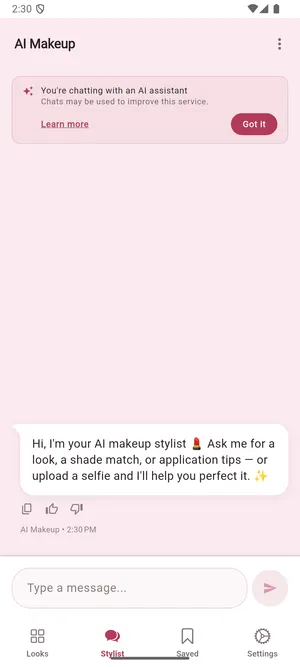
ai_disclosure_text— custom per-locale text. Null → the SDK’s default string.ai_data_reuse_notice— adds the “chats may be used to improve this service” line.ai_info_url— “Learn more” target (an About-AI page).privacy_urlis the fallback.
Acknowledgement
ai_disclosure_require_ack shows a one-time “Got it”. Once acknowledged, it’s remembered per project (per secretKey) across launches, and the banner collapses to a small persistent “AI” chip (compliant + unobtrusive). Storage per platform: UserDefaults (iOS), SharedPreferences (Android/Flutter), localStorage (Web).
Consent events
The SDK posts to /api/project/consent-events/:
disclosure_shown— when the notice renders;consent_given— when the user taps “Got it”.
Message reporting
message_reporting_enabled (default on — App Store UGC baseline) adds a long-press Good/Bad response menu on bot messages. “Bad response” opens a reason sheet (reason + optional note) that posts a pseudonymous report to /api/project/message-reports/. Reports appear in the dashboard’s Insights → Reports.