

Flutter AI Chat Reply Stalls Silently? Add a Watchdog
Exceptions are the easy failures. A SocketException or a 500 error reaches your catch, you show a message, and you're done. The failures that lose users throw nothing at all. Either the reply stops halfway through a sentence and the typing indicator spins forever, or the stream closes cleanly with zero tokens and leaves an empty bubble.
This post builds a small wrapper around the WidgetChat POST https://api.widgetchat.app/v1/chat/stream SSE loop that catches both cases. It resets an idle timer on every token, treats an empty finished stream as a failure, keeps whatever partial text arrived, and marks the bubble "Reply interrupted" with a one-tap retry.
Why an SSE stream stalls with no error
A streamed HTTP response is a long-lived connection. If a phone switches from Wi-Fi to cellular, a proxy drops an idle connection, or the upstream model hangs, the socket on your side often sees nothing: no FIN, no RST, no bytes. Dart's await for over the response stream just waits, because as far as it can tell the stream is still open.
The second silent case is a stream that ends normally but delivered no data: lines. Your loop exits, nothing is thrown, and the UI renders whatever is in the buffer, which is an empty string.
Neither case reaches a catch block, so you need two explicit checks:
- Idle watchdog: if no token arrives for N seconds, give up on this attempt.
- Empty-done check: if the stream finished but the buffer is blank, treat it as a failure.
Why not just Stream.timeout?
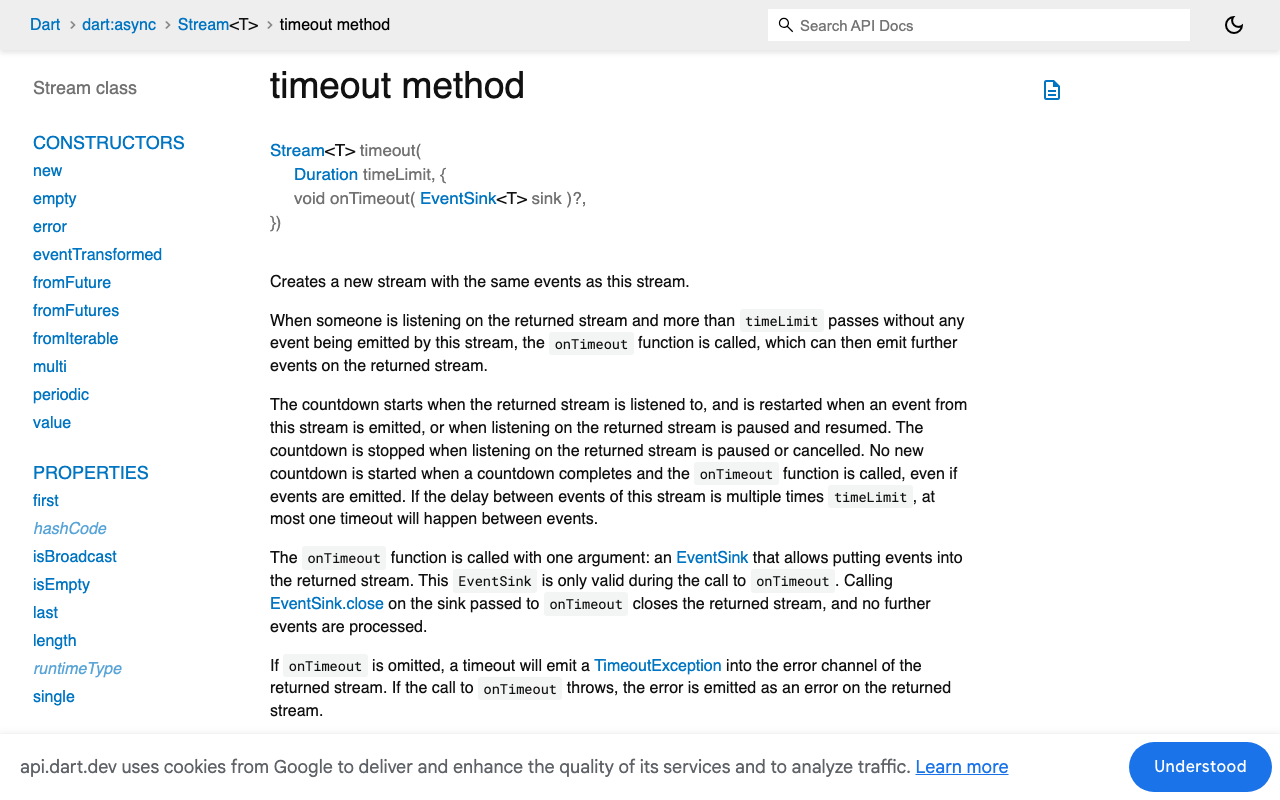
Dart has Stream.timeout, and its countdown restarts every time the source emits an event. That is close to what we want. The catch is that it resets on any event. If you apply it after splitting lines, SSE comment lines and blank separator lines also keep it alive, so a server sending keep-alives can look healthy while no token arrives. You also usually want a longer wait for the first token (retrieval and model warm-up) than between tokens.
A plain Timer that you re-arm only when you append real text gives you that control.
The watchdog wrapper
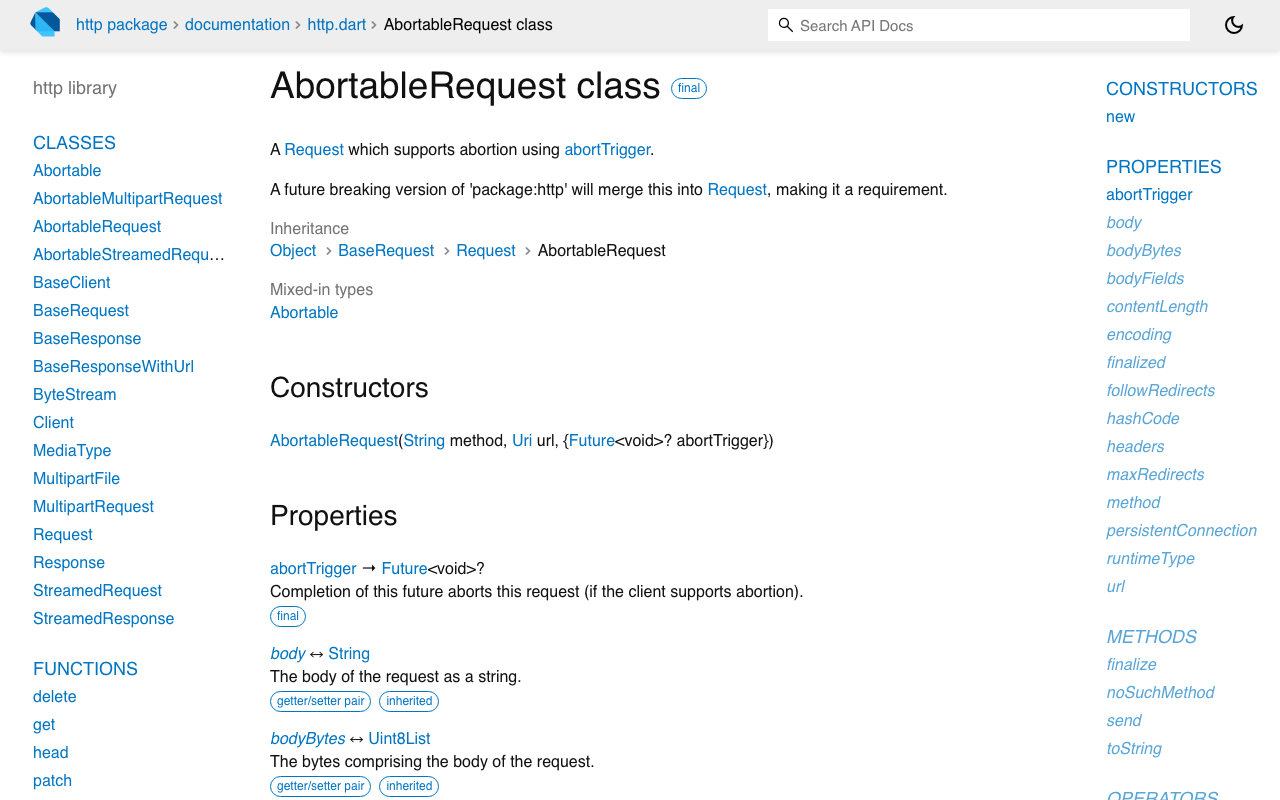
This uses package:http 1.5 or later. That release added AbortableRequest with an abortTrigger future, so you can close a stalled request instead of leaving it hanging.
import 'dart:async';
import 'dart:convert';

import 'package:http/http.dart' as http;

enum ReplyStatus { streaming, done, interrupted }

class ReplyResult {
  ReplyResult(this.text, this.status, [this.reason]);
  final String text;
  final ReplyStatus status;
  final String? reason;
}

Future<ReplyResult> streamReply({
  required http.Client client,
  required Map<String, String> headers,
  required Map<String, dynamic> body, // the same JSON body you already send
  required void Function(String partial) onPartial,
  Duration firstTokenTimeout = const Duration(seconds: 30),
  Duration idleTimeout = const Duration(seconds: 15),
}) async {
  final abort = Completer<void>();
  final buffer = StringBuffer();
  final result = Completer<ReplyResult>();
  StreamSubscription<String>? sub;
  Timer? idle;

  void finish(ReplyStatus status, [String? reason]) {
    idle?.cancel();
    if (result.isCompleted) return;
    if (status != ReplyStatus.done && !abort.isCompleted) abort.complete();
    result.complete(ReplyResult(buffer.toString(), status, reason));
  }

  void arm(Duration d) {
    idle?.cancel();
    idle = Timer(d, () {
      sub?.cancel();
      finish(ReplyStatus.interrupted, 'No data for ${d.inSeconds}s');
    });
  }

  final request = http.AbortableRequest(
    'POST',
    Uri.parse('https://api.widgetchat.app/v1/chat/stream'),
    abortTrigger: abort.future,
  )
    ..headers.addAll({
      ...headers,
      'Content-Type': 'application/json',
      'Accept': 'text/event-stream',
    })
    ..body = jsonEncode(body);

  arm(firstTokenTimeout); // covers waiting for headers too
  try {
    final response = await client.send(request);
    if (result.isCompleted) return result.future; // watchdog already fired
    if (response.statusCode != 200) {
      finish(ReplyStatus.interrupted, 'HTTP ${response.statusCode}');
      return result.future;
    }

    sub = response.stream
        .transform(utf8.decoder)
        .transform(const LineSplitter())
        .listen(
      (line) {
        if (!line.startsWith('data:')) return; // comments, blank lines
        final token = parseToken(line.substring(5));
        if (token.isEmpty) return;
        buffer.write(token);
        onPartial(buffer.toString());
        arm(idleTimeout); // reset only on real text
      },
      onError: (Object e) => finish(ReplyStatus.interrupted, '$e'),
      onDone: () {
        if (buffer.toString().trim().isEmpty) {
          finish(ReplyStatus.interrupted, 'Empty reply');
        } else {
          finish(ReplyStatus.done);
        }
      },
      cancelOnError: true,
    );
  } catch (e) {
    finish(ReplyStatus.interrupted, '$e');
  }
  return result.future;
}

// Adapt to the payload your stream sends on each data: line.
String parseToken(String data) => data.startsWith(' ') ? data.substring(1) : data;
A few details that matter:
finishis idempotent. The timer,onError,onDoneand thecatchcan race, and only the first one wins.- The first-token timer starts before
client.send, so it also catches a server that never sends headers. - On timeout the wrapper cancels the subscription and completes
abortTrigger, so the connection is released instead of staying open in the background. bufferis never cleared on failure. The partial text survives into the result.
Keep parseToken matched to what your project's stream actually returns on each data: line. If your stream sends an end marker, filter it out there so it never shows up in the bubble.
Showing the failure in the bubble
The bubble needs a status as well as its text. Store ReplyStatus on the message and render a small footer when the reply was interrupted.
class ChatMessage {
  ChatMessage({required this.prompt, this.text = '', this.status = ReplyStatus.streaming});
  final String prompt; // the user message that produced this reply
  String text;
  ReplyStatus status;
}

class AssistantBubble extends StatelessWidget {
  const AssistantBubble({super.key, required this.message, required this.onRetry});
  final ChatMessage message;
  final VoidCallback onRetry;

  @override
  Widget build(BuildContext context) {
    final failed = message.status == ReplyStatus.interrupted;
    return Column(
      crossAxisAlignment: CrossAxisAlignment.start,
      children: [
        if (message.text.isNotEmpty) Text(message.text),
        if (message.text.isEmpty && !failed) const Text('...'),
        if (failed)
          Row(children: [
            Icon(Icons.error_outline, size: 16, color: Theme.of(context).colorScheme.error),
            const SizedBox(width: 6),
            const Text('Reply interrupted'),
            TextButton(onPressed: onRetry, child: const Text('Retry')),
          ]),
      ],
    );
  }
}
Wiring send and retry
Retry sends the same prompt again into the same bubble. The partial text stays on screen until the new attempt produces its first token and then gets replaced, so the user never stares at a blank bubble while the retry warms up.
Future<void> _run(ChatMessage msg) async {
  setState(() => msg.status = ReplyStatus.streaming);

  final r = await streamReply(
    client: _client,
    headers: _headers,
    body: _buildBody(msg.prompt),
    onPartial: (partial) {
      if (!mounted) return;
      setState(() => msg.text = partial); // replaces the old partial
    },
  );

  if (!mounted) return;
  setState(() {
    msg.status = r.status;
    if (r.text.isNotEmpty) msg.text = r.text;
  });
}

void _retry(ChatMessage msg) => _run(msg);
Log r.reason to your crash or analytics tool. A spike in "No data for 15s" after a release, or on one carrier, tells you far more than a user saying "the bot froze".
Picking timeout values
- First token: long enough for retrieval and model start-up. 20 to 30 seconds is a reasonable starting point.
- Between tokens: shorter. Healthy streams emit text steadily, so 10 to 15 seconds of silence mid-reply almost always means a dead connection.
- Measure, then tighten. Record the longest normal gap from real sessions and set the idle timeout a few times above it.
If you use Dio instead of package:http, the same idea applies, but Dio's own receiveTimeout can kill healthy long streams. See Fix Dio receiveTimeout Killing Long Flutter AI Chat Streams.
FlutterFlow: same logic in a custom action
In FlutterFlow, put streamReply and parseToken in a Custom Action (add http as a dependency), and keep the reply text and a status string in page or app state. Pass an Action callback for onPartial that updates the text, set the status from the returned result, and show the Retry button only when status == 'interrupted'. Its On Tap calls the same custom action with the stored prompt. When a "FlutterFlow streaming response stops" report comes in with no error in the logs, this is usually the whole fix.
The rest of the error-handling cluster
The watchdog covers silent failures. The loud ones have their own posts:
- Fix Flutter 'Connection closed while receiving data' in SSE for streams that drop with an exception.
- Fix Dio receiveTimeout Killing Long Flutter AI Chat Streams for Dio users.
- Cancel a Streaming AI Reply in Flutter and FlutterFlow for a stop button the user can tap, which uses the same
abortTriggerpattern.
Together they cover every way a streamed reply can end: done, thrown, stalled, empty, or cancelled.
Try WidgetChat free
WidgetChat adds an AI support chatbot to your Flutter or FlutterFlow app. It answers from your own content and streams replies token by token over SSE, and you don't need a proprietary SDK to integrate it. Put this watchdog around the stream and a stalled reply turns into a retry button instead of a frozen bubble. Try WidgetChat free.

Comments
Comments are coming soon. We'd love to hear your thoughts!