
Flutter SSE Chat Stream Lost on iOS Background: The Fix
The bug report always reads the same way: "I asked the assistant a question, a call came in, and when I came back the answer was gone." Sometimes the bubble is empty, sometimes it froze on half a sentence with the typing indicator still spinning.
If your Flutter or FlutterFlow app streams replies over Server-Sent Events (for WidgetChat that is POST https://api.widgetchat.app/v1/chat/stream, which returns token-by-token data: lines), this is not a server bug. It is the operating system closing your socket while the app is suspended, and your stream code not being written to expect it.
Why the reply disappears
On iOS the distinction that matters is not foreground versus background, it is running versus suspended. Apple's own forum guidance is that the system suspends a backgrounded app shortly after it leaves the screen, and that the total time you can delay suspension with beginBackgroundTask is about 30 seconds for the whole app. Once suspended, all low-level networking stops. A socket you held open across that suspension is invalid when the app comes back.
Android does the same thing, just later. Doze kicks in after the screen has been off for a while and the device is unplugged, and in deep Doze network access is suspended until the next maintenance window. A long streaming reply started right before the user locked the phone will hit the same wall.
On the Dart side, three things can happen to your http stream when the app resumes:
- The subscription throws
SocketException: OS Error: Bad file descriptor, errno = 9the moment Dart tries to read the dead socket. - The stream ends early with
onDoneand no error, because the server saw the connection drop. - Nothing happens at all, and the bubble sits there with a spinner until the server-side timeout.
If your widget clears the bubble on error, or only ever appends tokens, every one of those outcomes looks like a lost or frozen answer.
Step 1: Trust the right lifecycle event
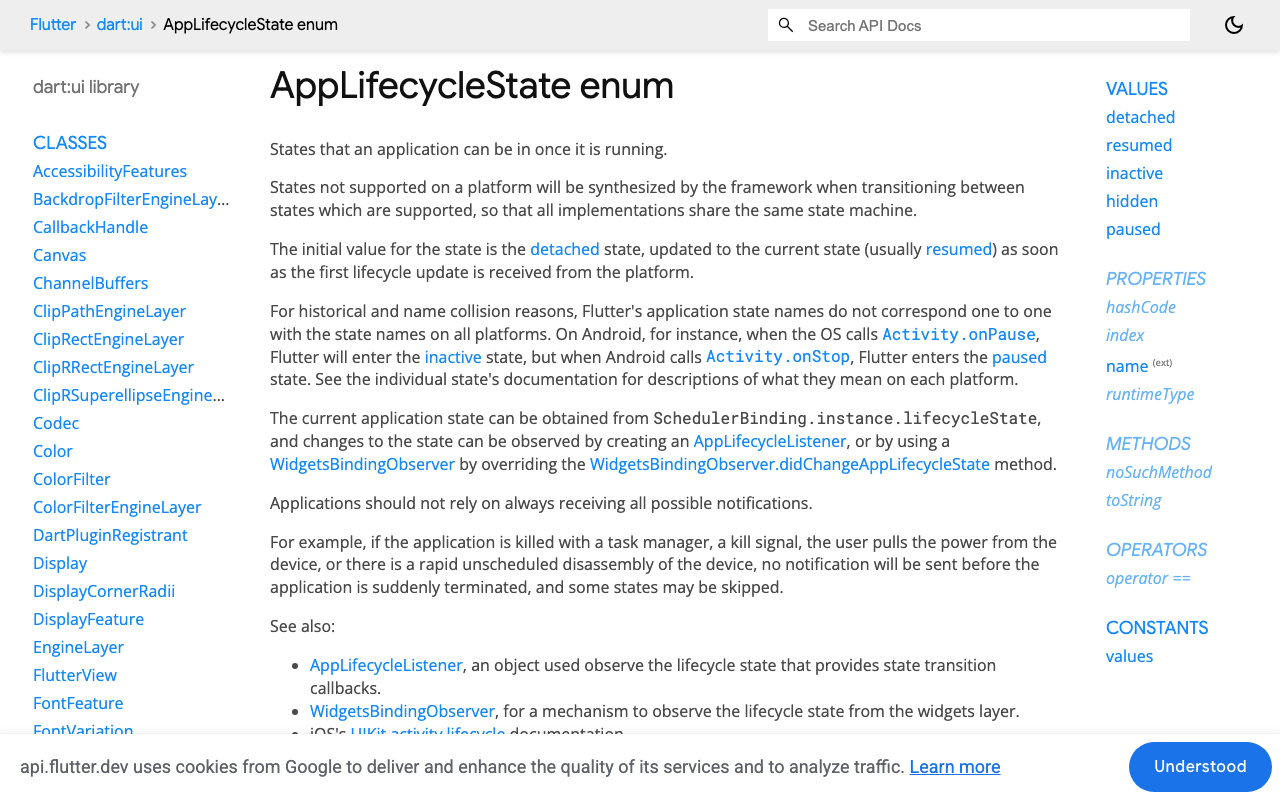
Flutter reports lifecycle through AppLifecycleState, and the trap here is inactive. On iOS you get inactive for Control Center, the notification shade, the app switcher, an incoming call banner and a Face ID prompt. None of those suspend the app. If you cancel the stream on inactive, every shade pull kills a reply that was going to finish fine.
Only paused means the app is actually hidden. Since Flutter 3.13 the framework also synthesizes hidden just before paused on iOS and Android, so cross-platform code can hook one state, but on mobile the state to act on is paused. Resume logic goes on resumed.
You can observe this with WidgetsBindingObserver, or with AppLifecycleListener and its onPause and onResume callbacks. The code below uses the observer because it is the one FlutterFlow custom actions can mix in without extra wiring.
Step 2: A lifecycle-aware stream controller
The rules are short. Cancel on paused yourself, before the OS does it for you. Keep whatever tokens arrived in state. On resumed, re-request the same message with the same client-side id and write the new stream into a fresh buffer that replaces the old text. Never append the second stream to the first.
import 'dart:async';
import 'dart:convert';
import 'dart:io';

import 'package:flutter/widgets.dart';
import 'package:http/http.dart' as http;

class ChatTurn {
  ChatTurn({required this.id, required this.userText});
  final String id; // generated on the client, e.g. a uuid v4
  final String userText;
  String reply = '';
  bool done = false;
  bool interrupted = false;
}

class ChatStreamController with WidgetsBindingObserver {
  ChatStreamController(this.onChange) {
    WidgetsBinding.instance.addObserver(this);
  }

  final VoidCallback onChange;
  http.Client? _client;
  StreamSubscription<String>? _sub;
  ChatTurn? _active;

  Future<void> send(ChatTurn turn) {
    _active = turn;
    return _open(turn);
  }

  Future<void> _open(ChatTurn turn) async {
    await _close();
    final client = http.Client(); // never reuse a client across a suspension
    _client = client;

    final req = http.Request(
      'POST',
      Uri.parse('https://api.widgetchat.app/v1/chat/stream'),
    )
      ..headers['Content-Type'] = 'application/json'
      ..headers['Accept'] = 'text/event-stream'
      ..body = jsonEncode({
        // body shape per your WidgetChat project settings
        'message': turn.userText,
      });

    final http.StreamedResponse res;
    try {
      res = await client.send(req);
    } on SocketException {
      turn.interrupted = true;
      onChange();
      return;
    }

    final fresh = StringBuffer();
    _sub = res.stream
        .transform(utf8.decoder)
        .transform(const LineSplitter())
        .listen(
      (line) {
        if (!line.startsWith('data:')) return;
        fresh.write(_tokenFrom(line.substring(5)));
        turn.reply = fresh.toString(); // replace, never append
        onChange();
      },
      onError: (Object _) {
        // errno 9 and friends land here: mark, do not clear
        turn.interrupted = true;
        onChange();
      },
      onDone: () {
        turn.done = !turn.interrupted;
        onChange();
      },
      cancelOnError: true,
    );
  }

  String _tokenFrom(String payload) => payload.trimLeft();

  @override
  void didChangeAppLifecycleState(AppLifecycleState state) {
    switch (state) {
      case AppLifecycleState.paused:
        _onPaused();
      case AppLifecycleState.resumed:
        _onResumed();
      default:
        break; // inactive and hidden: shade pulls, call banners, switcher
    }
  }

  Future<void> _onPaused() async {
    final turn = _active;
    if (turn == null || turn.done) return;
    turn.interrupted = true; // turn.reply keeps the partial text
    await _close();
    onChange();
  }

  Future<void> _onResumed() async {
    final turn = _active;
    if (turn == null || turn.done || !turn.interrupted) return;
    turn.interrupted = false;
    await _open(turn); // same id, fresh buffer
  }

  Future<void> _close() async {
    await _sub?.cancel();
    _sub = null;
    _client?.close();
    _client = null;
  }

  void dispose() {
    WidgetsBinding.instance.removeObserver(this);
    _close();
  }
}
The ChatTurn.id is the piece that prevents duplicates. The message list is keyed by that id, so the re-request on resume writes into the same bubble instead of creating a second one. If your WidgetChat stream wraps each token in JSON rather than raw text, decode it inside _tokenFrom; the lifecycle logic does not change.
One cosmetic note: the first token of the second stream is shorter than the partial you kept, so a naive rebuild flashes the bubble down to one word. If that bothers you, render the old partial in a muted colour until fresh is at least as long as it, then switch.
Option B: keep the partial and offer 'tap to finish'
Re-streaming on every resume is the right default for support chat, but there are cases where you do not want it: the answer was nearly complete, the model is expensive, or the user came back three hours later and has moved on. In that case treat the partial as final and let the user decide.
if (turn.interrupted && !turn.done)
  TextButton.icon(
    onPressed: () => controller.send(turn), // same id, same bubble
    icon: const Icon(Icons.replay),
    label: const Text('Tap to finish this answer'),
  ),
To get this behaviour, make _onResumed do nothing and leave the interrupted flag set. Everything else stays the same.
The errno 9 trap
The Bad file descriptor error only shows up when you let the OS close the socket instead of closing it yourself. The subscription survives suspension in Dart's memory, the file descriptor behind it does not, and the next read fails. It has been reported against package:http on dart-lang/http issue #197 and across realtime SDK forums for years, always with the same workaround: close the stream on pause and reopen on resume.
Two habits keep it out of your crash logs. Close the client in _onPaused so the read never happens. And treat onError in the listener as "interrupted", never as "reset". If the error does slip through because the app was suspended before _onPaused finished, the partial text still survives and the resume path re-streams as normal.
Composing with the watchdog and offline queue
If you already have a stall watchdog that marks a reply as stuck when no token arrives for a few seconds, stop that timer inside _onPaused and restart it inside _open. Otherwise the timer wakes up with the app and reports a stall that was really a suspension.
If you also have an offline send queue, the resume path slots in neatly. When _open fails with a SocketException on the first send, the device is probably still reconnecting to Wi-Fi after the lock screen. Push the turn into the pending queue under its existing id and let the queue drain call _open. Because the bubble is keyed by id, the queue cannot produce a duplicate either.
FlutterFlow notes
Wrap the controller in a custom action and hold the instance somewhere that outlives the page, such as a top-level variable in your custom code file. A controller created inside a page widget loses its observer on navigation, and the resume event fires into nothing. Call dispose only when the chat is torn down for good.
If you use the WidgetChat live voice call inside the same widget, this text-stream logic does not apply to it; the voice session has its own handling. The lifecycle rules above are for the SSE text path.
Try WidgetChat free
WidgetChat gives you a streaming AI support chatbot for Flutter and FlutterFlow that answers from your own content, over the same POST /v1/chat/stream endpoint used above. Start on the free tier at widgetchat.app, drop the controller into your app, and your users stop losing answers to phone calls.

Comments
Comments are coming soon. We'd love to hear your thoughts!