
Fix setState() After dispose() in Flutter AI Chat Streams
Your streaming support chat works. Tokens arrive from POST https://api.widgetchat.app/v1/chat/stream, the bubble grows, and then a user hits back halfway through a long answer. The console prints:
setState() called after dispose(): _ChatScreenState#3f2a1(lifecycle state: defunct, not mounted)
This error happens if you call setState() on a State object for a widget that no longer appears in the widget tree...
This error might indicate a memory leak if setState() is being called because another object is retaining a reference to this State object after it has been removed from the tree.
The usual Stack Overflow answer is if (!mounted) return;. That silences the error. It does not fix the bug, and the error message itself tells you why: something is still holding a reference to your State. That something is the SSE stream.
Why a mounted check alone is not enough
Here is the typical code that produces the error:
final response = await http.Client().send(request);
response.stream
    .transform(utf8.decoder)
    .transform(const LineSplitter())
    .listen((line) {
  if (!mounted) return; // the "fix"
  setState(() => _reply += _tokenFrom(line));
});
After the user pops the page:
- The
StreamSubscriptionis still active, so the listener closure keeps running for every chunk. It capturesthis, so the dead State and its message list cannot be garbage collected until the stream ends. That is your flutter chat streaming memory leak. - The
http.Clientis never closed, so the socket stays open. - The server sees a healthy connection and keeps generating. You pay for tokens nobody will read.
- If the user opens the chat again, a second stream starts while the first is still running. Do that a few times and you have the classic flutter SSE stream leak on navigate back.
The mounted check hides the symptom. The fix is to make the page own the request and tear it down in dispose().
What actually stops the request
Three things, in this order:
- Abort the request.
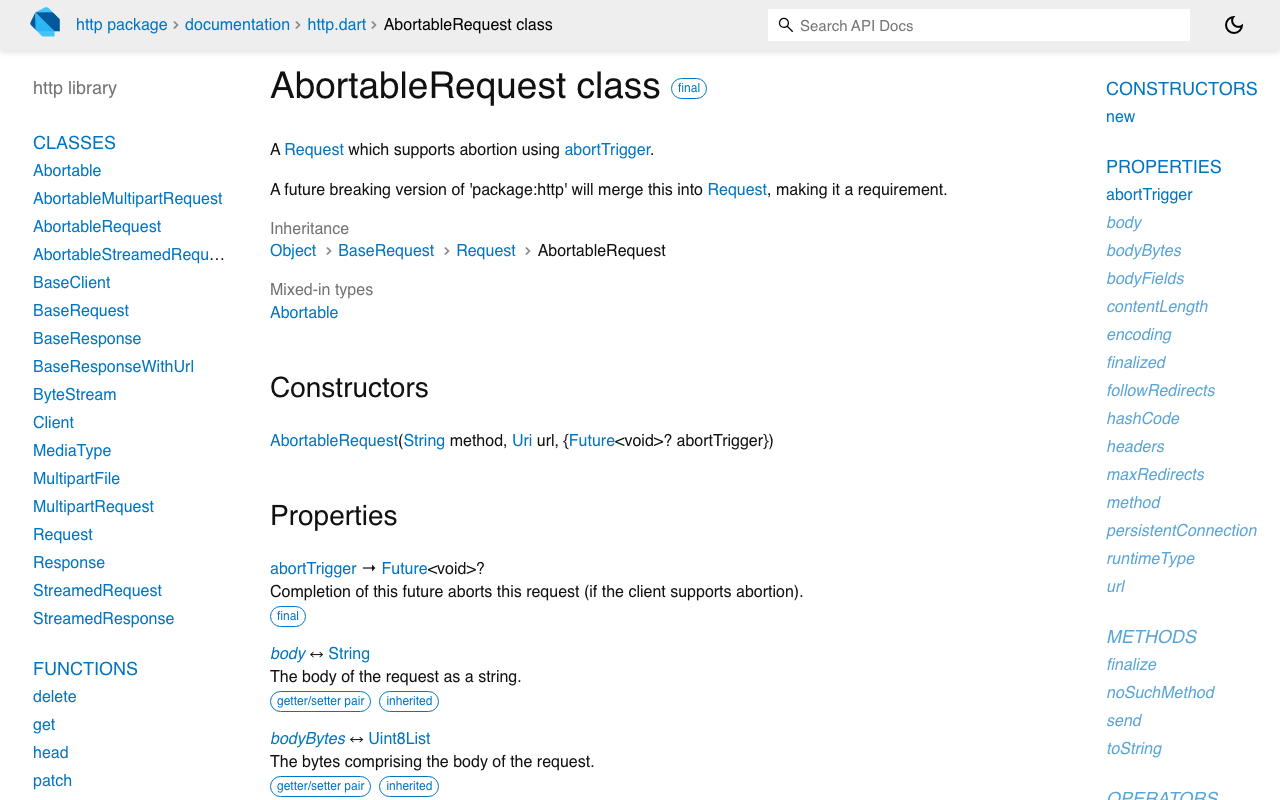
package:http1.5.0 addedAbortableRequest, which takes anabortTriggerfuture. Completing it aborts the request. If the response has not arrived yet,client.send()throwsRequestAbortedException. If it is mid-stream, the exception is added toresponse.streamand the stream closes. - Cancel the
StreamSubscription. This guarantees youronDatacallback never runs again, whatever the platform client does with buffered chunks. - Close the
http.Client. Each chat request gets its own client, so closing it is safe and releases the connection.
The Dart docs note that some client implementations may not support aborting, which is why you do all three instead of trusting one. Add the dependency:
dependencies:
  http: ^1.5.0
A small owner class for the stream
Put the teardown logic in one place so the page cannot forget a step. This class holds the client, the subscription and the abort trigger, and knows nothing about widgets.
import 'dart:async';
import 'dart:convert';
import 'package:http/http.dart' as http;

class ChatStreamOwner {
  http.Client? _client;
  StreamSubscription<String>? _sub;
  Completer<void>? _abort;
  bool _disposed = false;

  bool get isStreaming => _client != null;

  Future<void> start({
    required String apiKey,
    required Map<String, dynamic> body,
    required void Function(String data) onData,
    required void Function() onDone,
    required void Function(Object error) onError,
  }) async {
    if (_disposed) return;
    cancel(); // never run two streams at once

    final abort = _abort = Completer<void>();
    final client = _client = http.Client();

    final request = http.AbortableRequest(
      'POST',
      Uri.parse('https://api.widgetchat.app/v1/chat/stream'),
      abortTrigger: abort.future,
    )
      ..headers['Content-Type'] = 'application/json'
      ..headers['Accept'] = 'text/event-stream'
      ..headers['Authorization'] = 'Bearer $apiKey'
      ..body = jsonEncode(body);

    try {
      final response = await client.send(request);
      // The page may have been popped while we waited for headers.
      if (_disposed || !identical(client, _client)) return;

      _sub = response.stream
          .transform(utf8.decoder)
          .transform(const LineSplitter())
          .listen(
            (line) {
              if (!line.startsWith('data:')) return;
              final data = line.substring(5).trim();
              if (data.isNotEmpty && data != '[DONE]') onData(data);
            },
            onError: (Object e) {
              if (e is! http.RequestAbortedException) onError(e);
              _release(client);
            },
            onDone: () {
              onDone();
              _release(client);
            },
            cancelOnError: true,
          );
    } on http.RequestAbortedException {
      // Cancelled before the first byte. Nothing to report.
    } catch (e) {
      if (!_disposed) onError(e);
      _release(client);
    }
  }

  void cancel() {
    final abort = _abort;
    if (abort != null && !abort.isCompleted) abort.complete();
    _sub?.cancel();
    _client?.close();
    _sub = null;
    _client = null;
    _abort = null;
  }

  void dispose() {
    _disposed = true;
    cancel();
  }

  void _release(http.Client client) {
    if (identical(client, _client)) cancel();
  }
}
A few details that matter:
- The await gap. Most of the wait in an AI chat happens before the first byte, while the model is thinking. If the user leaves during that gap there is no subscription to cancel yet. Completing the abort trigger handles it, and the
_disposedcheck afterawaitmakes sure a late response never gets a listener. identical(client, _client)stops a slow, superseded request from attaching after a newer one started.LineSplittermatters because several SSE events often arrive in one chunk. Log one rawdata:line from your stream and parse it to match; do not guess the payload shape.cancel()returns a Future butdispose()is synchronous. Calling it withoutawaitis fine: the subscription stops delivering events immediately.
Wiring it into the chat page
The page now has one field and one line in dispose():
class _ChatScreenState extends State<ChatScreen> {
  final _stream = ChatStreamOwner();
  final _messages = <ChatMessage>[];

  Future<void> _send(String text) async {
    setState(() {
      _messages
        ..add(ChatMessage.user(text))
        ..add(ChatMessage.assistant(''));
    });

    await _stream.start(
      apiKey: widget.widgetChatKey,
      body: {'message': text, 'conversation_id': widget.conversationId},
      onData: (data) {
        if (!mounted) return; // belt and braces, no longer the fix
        setState(() => _messages.last = _messages.last.append(_tokenFrom(data)));
      },
      onDone: () { if (mounted) setState(() {}); },
      onError: (e) { if (mounted) _showRetry(e); },
    );
  }

  @override
  void dispose() {
    _stream.dispose(); // abort, cancel, close: before super.dispose()
    super.dispose();
  }
}
The mounted check stays as a cheap guard, but it is no longer doing the real work. With _stream.dispose() in place, popping the page drops the connection, the server sees the client disconnect, and the State can be collected. That is the correct answer to flutter cancel StreamSubscription on dispose and flutter http client close streaming response in one pattern.
If you use a state manager such as Riverpod or Bloc, the same owner moves into the provider or bloc, and its dispose() or close() calls _stream.dispose().
The FlutterFlow version
FlutterFlow makes this harder. A custom action is a top-level Future function, not part of the page's State. The page can be disposed while the action is still awaiting client.send() or reading the stream, and any action-parameter callback that updates page state then fires against a dead page.
The fix is to keep one owner outside the page and let a tiny invisible custom widget cancel it when the page goes away.
Custom action (streamWidgetChat):
// Automatic FlutterFlow imports go here.
import 'package:http/http.dart' as http; // and the ChatStreamOwner class above

final chatStreamOwner = ChatStreamOwner();

Future streamWidgetChat(
  String apiKey,
  String message,
  Future Function(String token) onToken,
) async {
  await chatStreamOwner.start(
    apiKey: apiKey,
    body: {'message': message},
    onData: (data) => onToken(data),
    onDone: () {},
    onError: (e) => debugPrint('chat stream error: $e'),
  );
}
Custom widget (ChatStreamGuard), dropped anywhere on the chat page with a width and height of 0:
// Automatic FlutterFlow imports go here.
import '/custom_code/actions/stream_widget_chat.dart' show chatStreamOwner;

class ChatStreamGuard extends StatefulWidget {
  const ChatStreamGuard({super.key, this.width, this.height});
  final double? width;
  final double? height;

  @override
  State<ChatStreamGuard> createState() => _ChatStreamGuardState();
}

class _ChatStreamGuardState extends State<ChatStreamGuard> {
  @override
  void dispose() {
    chatStreamOwner.cancel(); // page is gone, kill the stream
    super.dispose();
  }

  @override
  Widget build(BuildContext context) => const SizedBox.shrink();
}
Note that the guard calls cancel(), not dispose(). The owner is a shared object that the next chat page reuses, so it must stay usable. Because the guard lives in the page's widget tree, it is disposed on every exit path: the back button, the system back gesture, and a context.goNamed to another page. That covers the cases a button-only cancel misses.
Part of the stream lifecycle cluster
Leaving the screen is one of three ways a stream should end early. The other two have their own posts:
- The user wants to stop. Add a working Stop Generating button to Flutter AI chat and the FlutterFlow Stop button version reuse the same abort, cancel and close sequence.
- The server goes quiet. Add an idle-timeout watchdog cancels a stream that stops sending tokens without closing.
All three can call the same cancel() on the same owner, which is the point of having one.
Quick checklist
- One
http.Clientper chat request, closed when the request ends. - Store the
StreamSubscription; cancel it indispose()beforesuper.dispose(). - Use
AbortableRequestso leaving during the "thinking" gap also aborts. - Check a disposed flag after every
awaitbefore attaching a listener. - Keep
mountedchecks as a backstop, not the fix.
Try WidgetChat free
WidgetChat gives your Flutter or FlutterFlow app an AI support chatbot that answers from your own content, streamed token by token over SSE from a plain HTTP endpoint, so the lifecycle code above is all the client code you need. Start on the free tier at widgetchat.app and have streaming replies in your app today.

Comments
Comments are coming soon. We'd love to hear your thoughts!